
Sunflower LW + weather1.74 - Google Play
You'll be able to see results in few seconds.
Publisher Description
Flower Series Live Wallpaper - Project No. 1
Sunflower Live Wallpaper + weather
* Currently, weather service is not available. Please wait until I found another weather information provider.
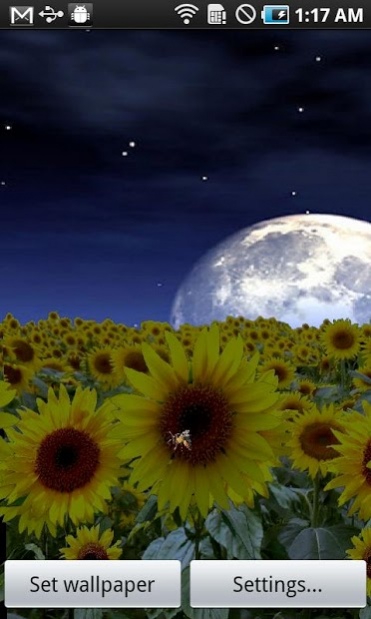
A beautiful animated live wallpaper of sunflowers with a changeable background, swing by the wind. Feel like walking in sea of sunflowers! It works both on smart phones and tablets.
* To check this wallpaper works well on your device or not, please download the free version to make a try.
* Remember, now you can double tap on home screen to open settings screen.
This version has a set of options of
* Ambient color of background
* Ambient color of flowers
* Change background images by current actual time
* Show flowers' emotion faces
* Show bees
and many other options.
Version 1.6
* Add a weather forecast icon
* You can check weather forecast by clicking the icon
* You can on/off the icon
Version 1.5
(This update needs your internet and GPS permission to get current weather infomation)
* added weather effect
(sunny, cloudy, chance of rain/snow/thunder_storm, rain, snow, fog, thunder_storm)
* added some links
Version 1.4
* fix a bug when you first open settings screen.
Version 1.3 - greatly changed
* Using a new model for camera view to get better performance for both portrait and landscape devices. It also makes the app run more smoothly.
* Background image changed.
* Add automatically changed ambient color.
* Add moving clouds.
* Slide the screen to show butterflies. (For free version, there will be two kinds of butterflies. In full version, there will be eight kinds of butterflies.)
Have fun with this Sunflower Live Wallpaper!
This app currently supports English, Korean, Chinese and Japanese.
FAQ:
1. How to set a live wallpaper?
On your home screen, press Menu -> Wallpapers -> Live Wallpapers -> then select which you want to set.
2. It shows a black screen, why?
This is probably caused by image loading. It means your device currently hasn't enough memory to load the images. Maybe you need to reboot your device, or kill some idle processes to free the memory. Then try it again.
If it still can not be solved, leave a message to me and I'll look on your problem later, thank you!
My Twitter: viennakanon
My Facebook: Zhenghong Wang
Project page on Facebook: https://www.facebook.com/FutureAppLaboratory
About Sunflower LW + weather
The company that develops Sunflower LW + weather is Zhenghong Wang. The latest version released by its developer is 1.74.
To install Sunflower LW + weather on your Android device, just click the green Continue To App button above to start the installation process. The app is listed on our website since 2013-06-14 and was downloaded 0 times. We have already checked if the download link is safe, however for your own protection we recommend that you scan the downloaded app with your antivirus. Your antivirus may detect the Sunflower LW + weather as malware as malware if the download link to zh.wang.android.SunflowerLiveWallpaper is broken.
How to install Sunflower LW + weather on your Android device:
- Click on the Continue To App button on our website. This will redirect you to Google Play.
- Once the Sunflower LW + weather is shown in the Google Play listing of your Android device, you can start its download and installation. Tap on the Install button located below the search bar and to the right of the app icon.
- A pop-up window with the permissions required by Sunflower LW + weather will be shown. Click on Accept to continue the process.
- Sunflower LW + weather will be downloaded onto your device, displaying a progress. Once the download completes, the installation will start and you'll get a notification after the installation is finished.
Program Details
System requirements
Download information
Pricing
Version History
version 1.74
posted on 2013-06-14
Version 1.6.6
* Fixed the bug.
After touching the weather forecast icon, the weather effect will be unavailable.
* Add a weather forecast icon
* You can check weather forecast by clicking the icon
* You can on/off the icon
Version 1.5 - greatly changed
(This update needs your internet and GPS permission to get current weather infomation)
* double tap on home screen to open settings screen
* added weather effect
(sunny, cloudy, chance of rain/snow/thunder_storm, rain, snow, fog, thunder_storm)
version 1.74
posted on 2013-06-13
Several fixes and updates
Disclaimer
Official Google Play Link
We do not host Sunflower LW + weather on our servers. We did not scan it for viruses, adware, spyware or other type of malware. This app is hosted by Google and passed their terms and conditions to be listed there. We recommend caution when installing it.
The Google Play link for Sunflower LW + weather is provided to you by apps112.com without any warranties, representations or guarantees of any kind, so access it at your own risk.
If you have questions regarding this particular app contact the publisher directly. For questions about the functionalities of apps112.com contact us.
